

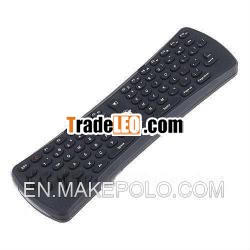
Description:
Adoption of USB 2.0 Micro Receiver to connect PC with this embeddedmotherboard through USB port.Four choices of CPI
Fly-Mouse 2.4GHz wireless Hot Key usb bluetroothmultimedia keyboard
Features
Adoption of USB 2.0 Micro Receiver to connect PC with this embeddedmotherboard through USB port.
Four choices of CPI, from 600 to 1200.
Advanced power saving technology, with function of sleepstatus.
Function of low voltage indicator. When the battery voltage dropsbelow 3.4V, LED flashes at 16Hz.
An operating range of 15 meters lets you navigate media fromanywhere in the room.
Compatible with Windows 98/ME/NT/2000/XP/VISTA.
New Design, in the air, innovate free space by motion sensing.
Sit back and use this Air mouse to surf the Web, browse photos, orlisten to music, play games in the room.
Explore your new media universe with a state-of-the-art keyboardmouse that''s effortless to use in the air.
With 78 keys, includes multimedia shortcut keys.
Control playback and volume with hand motions.
Adjust volume by waving to the right or left; skip tracks with aflip of the wrist.
Automatic frequency-hopping technology, strong anti-interference,high sensitivity.
Compact, portable and tiny design, can be used for travel, school,or any other working environment.
Especially suitable for HTPC environment.
How to use
Open the cover on the back of the Keyboard, and then put 3 newLP03 AAA type batteries into the battery compartment.
Plug the Micro Receiver into a USB port on your computer, keyboard,or display.
Just move your Keyboard easily by wave your wrist around. (Don''tkeep the mouse level while moving it, as it will not beresponsive.)
Function of the keys
(1)Keyboard
POWER: Computer sleep key. When press this key, computer willsleep. Other keys'' function is same as that of normalkeyboard.
The function of special key combination
[Shift] [F4]: open the home page of the Internet explorer
[Shift] [F5]: open the Outlook Express
[Shift] [F6]: open the media player
[Shift] [F7]: play the last
[Shift] [F8]: play or pause
[Shift] [F9]: play the next
[Shift] [F10]: make the volume mute
[Shift] [F11]: turn down the volume
[Shift] [F12]: turn up the volume
ESC G: Reset
[Shift] ESC: sensitivity control: 600DPI, 800DPI, 1000DPI, 1200DPIconversion
(2)Mouse:
To position: Hold the mouse key on the remote to move the cursor onthe PC.
Cursor will be located when release the mouse key.
Or: Double-click the mouse key to move the cursor, then click oncethe mouse key for cursor position (under this situation, no otherkey but left/right button of mouse can work only).
Left button of mouse: functions are the same as a normal mouse.
Right button of mouse: functions are the same as a normalmouse.
Specifications
Operation Range: up to 15 meters
Battery: 3*AAA batteries (included)
Frequency: 2.4GHz wireless
System Requirements: PC with USB port
Compatible with: Windows 98/ME/NT/2000/XP/VISTA
Color: Black
Item size: 20*6.5*3cm
Item weight: 119g
Package size: 29.2*9*3.8cm
Package weight: 322g
Package including
1 * Fly-Mouse
1 * USB dongle
3 * AAA Batteries
1 * User manual

