

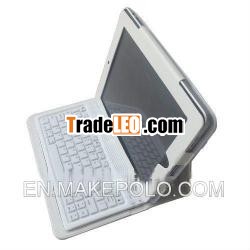
Description:
Bluetooth wireless keyboard Leather case for iPad 2Color: white, black
Packing: box.
Bluetooth wirelesskeyboard Leather case for iPad 2
| Product name | Bluetooth keyboard Leather case for iPad 2 |
| item No | K-BluetoothLC02 |
| Material of the case | High auqity PU |
| Material of the keyboard | High quality Silicone |
| Color | Black, white |
| Feature 1 | Built-in wireless Bluetooth 2.0 silicone keybaord |
| Feature 2 | Built-in rechargeable lithium battery lasts for approximately45 hours per charge |
| Suitable for | iPad 2 |
| MOQ | 50pcs |
| Capacity | 2000pcs per week |
| Packing | Box |
| Packing included | 1. PU leather case w/keyboard 2. USB Power Char.ging Cable 3. User guide |
| Box packing size | 31*21*3.5CM |
| lead time | one week |
| Payment term | T/T, L/C, Western Union, Paypal |
Features:
1. Built-in wireless Bluetooth 2.0 silicone keybaord;
2. Stylish protective PU leather case designed for ipad;
3. with Stand for iPad display for easy viewing;
4. Built-in rechargeable lithium battery lasts for approximately 45hours per charge;
5. Special(home) screen key for one touch access to variety ofapplication;
6. Light weight, quiet keystrokes, water-proof and dust-proof;
7. Energy saving keyboard sleep mode.
8. box packing size: 31*21*3.5CM.
Compatible with:
The wireless keybaord can be connected to the iPhone 3G, 3GS, 4G,iPod Touch, iPad and iPad 2 that had installed iOS 4.0 or newerversions
How to use the bluetooth with keyboard:
Step 1: Turn on the power toggle switch. The "power" and"bluetooth" indicator light will be in 5 seconds, then the lightwill go off;
Step 2: Press on the "connect" button. The "bluetooth" indicatorlight will be blinking, and the "Power" indicator will be on. Thekeyboard is now ready to be connected to the iPad;
Step 3: Turn on the iPad, click the "setting" icon;
Step 4: On the setting menu, select "General" to access "bluetooth"setting. Click "bluetooth" to turn on the connection, and iPad willautomatically search for a bluetooth-enabled device;
Step 5: Wireless keyboard found. Click on the device toconnect;
Step 6: Enter the password code which was displayed on thescreen
Step 7: Wireless keyboard connected successfully. "Power" indicatorlight will stay on until the key-board is switched off.
Packing contents:
1. PU leather case w/keyboard
2. USB Power Char.ging Cable
3. User guide

