

Send Inquiry
Description:
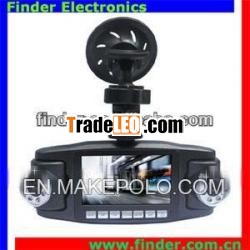
2013 New Car DVR Dual Camera GPS with 300-megapixel CMOS SensorModel:CDV60 USB 2.0 Interface 2.7"HD TFT display H.264 video2013 New Car DVR Dual Camera GPS with 300-megapixel CMOSSensor
Model:CDV60
USB 2.0 Interface
2.7"HD TFT display
H.264 video
| full hd cardvr with build in GPS, G-sensor and google map |
| H.264 video code |
| dural camera taking video at the sametime |
| seamless loop recordingfunction |
| automatically taking video when start thecar, it will turn off automatic after shutdown thecar |
| taking video duringcharging |
| car driving anti-shakefunction |
| motion detection function |
| PC camera function |
| maximum support for 32GB SD memorycard |
| illumination, 300-megapixel CMOSsensor |
| dualultra-wide angle lens 120 degrees |
| 180 degrees rotation after thelens |
| 2.7-inch high-definition TFTdisplay |
| videooutput: 1280x720P 30 frames/sec |
| photooutput 1600x1200JPG |
| sensor | 3 million pixel CMOSsensor |
| videoresolution | VGA(1280x480)QVGA(640x240) |
| visual angle | left lensis 120-degree; right lens is 68-degree |
| LCD | 2.7" HD TFTdisplay |
| video format | AVI fileformat 30fps |
| photo format | JPEG |
| continuous video recordingtime | built-in battery about 2.5hours |
| memory card | TF1GB-32GB |
| USB interface | USB2.0 |
| operating system | windows200/me/xp/2003;Vista |
| TVoutput | NTSC/PAL |
| batterycapacity | 550mAH |
| chargingtime | about 3hours |
| storageconsumption | VGA format90MB/minute |
| Items | Sub-menu | Description | Functions |
| video modesub-menu | |||
| 1 | resolution | VGA(default)QVGA | select output size of the videofile |
| 2 | lens combination | CAM1/CAM2/CAM12(default)CAM2 1 | select themode of using lens |
| 3 | exposure value | 2.0/ 1.0/0.0(default)/-1.0/-2.0 | select exposure value |
| 4 | time stamp | off/date/date andtime(default) | display date and time onpicture |
| 5 | voice record function | on(default)off | voice record on and off |
| camera modesub-menu | |||
| 1 | delete | VGA/1.3M/2M/3M/5M(default) | selectoutput size of the picture |
| 2 | protect | CAM1/CAM2/CAM12(default)CAM2 1 | select themode of using lens |
| 3 | thumbnail | 2.0/ 1.0/0.0(default)/-1.0/-2.0 | select exposure value |
| 4 | volume | off/date/date andtime(default) | display date and time onpicture |
| replay modesub-menu | |||
| 1 | delete | single/all/select | select deletion file |
| 2 | protect | single/all/select | select protection file |
| 3 | thumbnail | execute | thumbnail view |
| 4 | volume | 1/2/3/4/5/6/7/8 | adjust volume of the built-inloudspeaker |
| system settingsmenu | |||
| 1 | format | cancel(default)excute | format memory card |
| 2 | beep tone | on(default)off | enable anddisable the key tone |
| 3 | languages | English/French/German/Italian/Spanish/Portuguese/TraditionalChinese/Simplified Chinese/Japanese/Russian | display the selectedlanguage |
| 4 | autooff | off/3min(default) | if you donot do anything, DVR will turn off automatically in 3min.(default) |
| 5 | system reset | execute/cancel(default) | restore default settings |
| 6 | frequency | 50Hz | most european powerfrequency |
| 60Hz(default) | most the united states powerfrequency | ||
| 7 | video output | NTSC(default) | video format of the United States andJapan |
| PAL | video format of Europe | ||
| 8 | input date | adjustment year, month, day andtime | |
| 9 | motion detection | cancel(default)settings | settings motion detection |

