

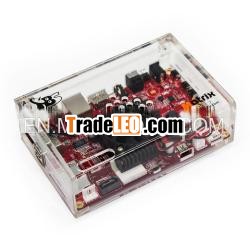
What''s TBS2910 Matrix ARM Mini PC?
Matrix ARM Mini PC is a singleboard mini computer based on ARM with a wide range of interface,equipped with a powerful i.MX6 Freescale processor, it can runAndroid, Linux and other operating systems, a switch betweendifferent operating systems can be done within just a few minutes!Matrix also has great support for TBS USB tuners and popularsoftware such as XBMC, VDR, Tvheadend, DVBLast and so on.
Features
TBS Tuner Support
Equipped with the mini PCIe slot and USB ports,Matrix works perfectly with TBS USB tuners.
Freescale Quad Core
based on Freescal i.MX6, Matrix provides a much more powerfulready-to- run platform.
Open Source
It’s 100% open source, Matrix runs Linux, Android, Ubuntu, andany other OS you like.
To switch from one OS to another, you only need to burn the newOS into the eMMC on the Matrix board, and then reboot it.
XBMC, VDR, Tvheadend Support
Popular software like XBMC, VDR, Tvheadend are ready forMatrix.
Specification:
System-on-a-chip (SoC) | Freescal MCIMX6Q5EYM10AC |
CPU | Quad ARM Cortex-A9 at 1.0GHz |
GPU | Vivante GC2000, Quad core GPU, Quad IPU |
RAM | 2GB DDR |
USB 2.0 ports | 3x USB 2.0 |
Audio & Video interface | HDMI port |
3.5 mm jack | |
Storage | eMMC |
1x SD card slot | |
1x TF card slot | |
Network | 10/100/1000 wired Ethernet |
WIFI IEEE 802.11n/b/g | |
Power input | 5 V, 3A |
Size | board:130*83 mm |
case: | |
Package contents | 1x Matrix ARM mini PC |
1x power adapter | |
1x SATA power cable | |
1x RS232 adapter board (optional) |
HDMI SLOT:
For connection to a digital TV or display with HDMI input.
LAN:
For connection with network cable.
USB 2.0 SLOT:
For connection with keyboard, mouse or other USB device.
WIFI ANTENNA:
For WIFI signal reception.
GPIO/UART/I2C:
For connection with peripheral device.
SD CARD SLOT:
For SD card insertion.
SATA:
For connection with hard disk.
Main Chip:
Freescal MCIMX6Q5EYM10AC
BURN/ BOOT MODE:
A switcher for the two modes:
a- BURN: move the switcher to this side, you can burn the OSinto the eMMC.
b- RUN: move the switcher to this side, you can run Matrix withthe OS in eMMC.
LED INDICATOR FOR WORKING STATUS:
The Blue LED light is flashing when Matrix is working.
AUDIO:
For connection with standard stereo 3.5 mm audio cable.
RESET:
For bringing Matrix back to the initial state.
DC 5V:
For connection with a power supply of 5V, 3A.
POWER:
LED INDICATOR FOR POWER.
VOLUME /-:
Buttons for volume control.
MINI PCIe:
Mini PCIe slot for connection with mini PCIe device.
RS232 SERIAL PORT:
For connection with RS232 serial cable.
OTG:
An OTG cable should be connected to the OTG port, when you wantto burn a new OS into the eMMC.

