

www.acewatchmovement.com
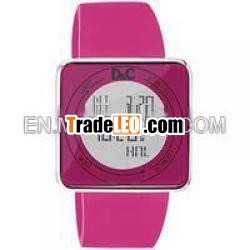
high quality 2011 new design Touch screen Lcd Watch
Packaging Detail: Tin Box in silver color User Manual inmulti-languages
Delivery Detail: 15 days
Specifications
it''s a touch-screen lcd watch
LED Color: Red/Blue/White/black
Display:time&date week
Function:chronograph.timer,alarm.light
touch-screen LCD watch catch the most fashion trend
1. Lowest price for factory lcd watches
2. alloy case with silicone strap
3. can be OEM LOGO & Packing
4.touching screen lcd watch --special way of displaying time
5.,high quality 1 year guarantee .it Have count downand stop watch function, display time,minutes.seconds.date.month ,week. Dial with a light to light up & Watchtime.
how to use this watch:
there are 4 touch sensors around the lens of the watch (S1,S2,S3and S4).
To unlock the sensors,press and hold S4 snesor for approximately 1second,
then slide on the lens from S4 sensor to S3 sensor, then to S2sensor in anti
clockwise direction. the touch sensor indicator T will be displayedto indicate
the touch sensors are unlocked.
when no sensors are pressed for 10 seconds. the touch sensorlock will
automatically be activated (except in CHRonOGRAPH mode andTIMER
mode when the chronograph or timer is in use) and the touch sensorswill locked
The watch has five display modes:
NORMAL TIME
WORLD TIME (WT)
ALARM (AL)
CHRonOGRAPH (CH)
TIMER (TR)
To change from one display mode to another, press S3 sensoronce.
1.Press S3 sensor to select NORMAL TIME mode.
2.Press and hold S2 sensor, the message” HOLD TO SET”will bedisplayed
for 2 seconds and the local city selection will blink. slidefrom S2 sensor to S1 sensor or vice versa to cycle forward or backward through the 32
preset cities/time zones to select your home city fordisplaying in
NORMAL TIME. holding the sensor after sliding from onesensor to
Another will speed up the process.
3.Press S3 sensor, the Daylight Savings Time(DST) setting willblink..slide
From S2 sensor to S1 sensor or vice versa to togglebetween ON and
OFF of the DST setting. Note that setting DST for NORMALTIME does
not automatically apply to the same city in WORLD TIME.you must
apply DST to WORLD TIME cities separately.
4.Press S3 sensor,the hour digits will blink.. slide from S2sensor to S1
Sensor or vice versa o increase or decrease the value.holding the
Sensor after sliding from one sensor to another will speedup the process.
5.Press S3 sensor, the minutes digits will blink. slide from S2sensor to S1
Sensor or vice versa to increase or decrease the value.Holding the
Sensor after sliding from one sensor to another will speedup the process.
6.Press S3 sensor, the seconds digits will blink, slide from S2sensor to S1
Sensor or vice versa to reset the second digits tozero.
7.Press S3 sensor, the year digits will blink. slide from S2sensor to S1
Sensor or vice versa to increase or decrease the value.holding the
Sensor after sliding from one sensor to another will speedup the process.
8.Press S3 sensor, the month digits will blink, slide from S2sensor to S1
Sensor or vice versa to increase or decrease the value.holding the
Sensor after sliding from one sensor to another will speedup the process
9.Press S3 sensor, the date digits will blink, slide from S2sensor to S1
Sensor or vice versa to increase or decrease the value.holding the
Sensor after sliding from one sensor to another will speedup the process
10.Press S3 sensor, the hour format setting will blink, slidefrom S2 sensor
to S1 Sensor or vice versa to toggle between 12-hour and24-hour format.
The P.M indicator will be displayed to indicate the timeperiod 12:00
P.M-11:59 P.M. in 12-hour format.
11.Press S3 sensor, the “BEEP” setting will blink. the “BEEP”option will
cause the watch to beep anything a sensor is pressed.slide from S2 sensor
to S1 sensor or vice versa to toggle between ON and OFFfor the beep setting.
12.Press S3 sensor, the hourly chime (CHIME) setting will blink.slide from
S2 sensor to S1 sensor or vice versa to toggle between onand OFF for hourly
Chime setting.
13.When finished making all the settings, press and hold S3sensor for
approximately 3 seconds to /confirm/i.

