

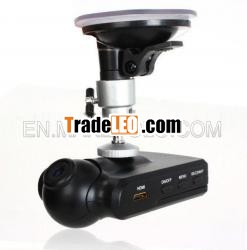
Brand:E-Power & China Dragon
MOQ:10
Quantity:5
Product Picture and Function | |||
| |||
1. | SD/MMC Card Slot | 10. | Mode Button |
2. | Working(Green) indicator Charging(Red) indicator | 11. | USB Slot |
3. | Microphone | 12. | 5V Direct Current Slot |
4. | REC / Snap | 13. | Lens |
5. | Menu | 14. | Speaker |
6. | ON/OFF Power Switch | 15. | Reset hole |
7. | HDMI Slot | 16. | Mount hole |
8.9. | Up Down | 17. | 2.5 i nch LCD |
Operate | |
Two Power options | A) Use built-in Li-ion battery DVR can be activated after it has been placed on the vehicle by pressing the Power Switch 6 and turn off by pressing it again. Charging: connect with USB cable or car charger. The indicator display red and convert to no light when it is full B) Connect with Car Charger DVRwill record automatically when the car starts,turn off and save the last file when the car stops. |
Recording | DVR will enter into defaulted recording mode when turn it on,the work indicator blickers and indicates it is recording.The recording file is saved in the SD/MMC Card. To stop, press Recording Button 4 or ending when car stops , the work indicator won t blicker. |
Camera mode | Turn on the DVR and press Mode Button 10 to enter into Camera mode. To take photo by pressing Snap Button 4 . |
Preview and Delete | Turn on the DVR and press Mode Button10 twice to enter into Preview Mode, Press Up 8 or Down 9 to select the previewed file folder and enter into the index by pressing REC Button. If it is video file,it can play or stop by pressingREC Button.(e.g.:Index is named Y/M/D and file is named DRH/M/S,if want to preview the file 2001/01/01 12:01:01,enter into index 2001-01-01 andselect DR 120101 to play).If you want to delete it,press Menu Button 5 to enter into delete mode,and then, select current or all by REC Button or UP/Down and /confirm/ito delete the file by press Rec Button.If want to format, please select and /confirm/i Format by RECButton. |
USB Mode | Connect DVR with computer by USB cable, [My computer] will occur removable disk,the file is stored at the DVR index,the file is placed relevant Y/M/D index according recording time,the file is named by DR H/M/S. At the moment,the file of the DVR can be downloaded to the computer. |
Preview on the HDTV | Connect the HDMI link of DVR with the HD TV,then turn on the DVR And enter into the preview mode automatically,and the operating steps are same as previ ew on the screen. Note—— 1) Please insert the SD/ MMC card before recording. 2)This DVR records in cycle if you choose 2/5/15 minutes as storage time.When the storage medium is full, it will record from the beginning again and erase over the previously recorded material automatically.It will have 3 seconds pause time,and namely the contents in the 3 seconds will not recorded. 3)Because the DVR is DC5V input,please use the attached car charger. It have adaptor 12V/24V transfers to 5V already. |
Newest Black 2.5 Inch LCD 120 degree Wide Angle Lens Vehicle DVRwith Video Photo AV Out Functions(ER087B)

