

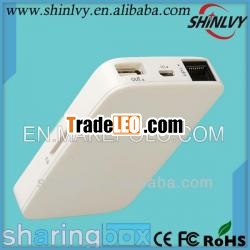
Step4: Power on your"sharing box"
Press the function key for 2seconds, all the function LED indicator will light up and then thewifi LE D indicator will flash.
Step 5:On yourmobile device, choose “Wi-Fi Settings” from the “Settings menu,Then, choose “sharingbox” to enable the connection. The initialpassword is 123456789.
Step6: once connected, launch the “sharingbox”application on yourmobile device and start to browse the digital content from“sharingbox”.
Step 7: Your “sharingbox” becomes aWiFi access point when plugging in an Ethernetcable.
Step 8: Connet the USB line to“sharingbox” USB OUT port, the built -in battery can charge yourmobile device.
Step9: When connect the“sharingbox” USB port to 3G card, launch the“sharingbox”application on your mobile device, choose thecorresponding 3G network type,then you can enjoy surfing thenet.(The device model needs to support3G.)
Security settings: The followingsettings are available in the “sharingbox” “Settings”menu
“Wi-FiSSID”: Change the name of your “sharingbox” (It is recommended thatyour change your own SSID)
“Password/ChangePassword”: Enable password and set up a passwordto protect data from being accessed by unauthorizedconnections.

